Your Flutter App Isn't Slow, You Are

Let’s be honest: 90% of "Flutter performance issues" are actually "bad developer issues." You pasted a 5,000-item list into a Column instead of a ListView.builder and now you're blaming the framework. Classic.
In 2025, there is absolutely no excuse for jank. Here is how to make your app fly.
1. Impeller is Non-Negotiable
If you are still holding onto the Skia engine on iOS because you're "scared of change," stop it. Impeller precompiles shaders, which means the dreaded "jank on first run" is dead. It’s the default for a reason. If your app stutters on an animation, it’s not the renderer anymore; it’s your main thread being blocked by heavy computation. Move that JSON parsing to an Isolate immediately.
2. The const Holy War
You see that blue squiggly line under your widget that says "Prefer const"? It’s not a suggestion. It’s a warning.
When you use const, Flutter knows that widget will never change. It builds it once and keeps it in memory. If you don't use const, the garbage collector has to work overtime cleaning up your mess every single frame.
Savage Tip: Enable the linter rule
prefer_const_constructors_in_immutablesand treat every warning as a compile error.
3. Stop Rebuilding the World
If your build() method looks like a novel, you failed.
Break your widgets down. If you have a Consumer (Riverpod) or BlocBuilder wrapping your entire Scaffold, the whole screen redraws every time a single integer changes. That is rookie behavior. Wrap only the Text widget that changes.
The Receipts
Here is the difference between "It works on my machine" and "Production Ready":
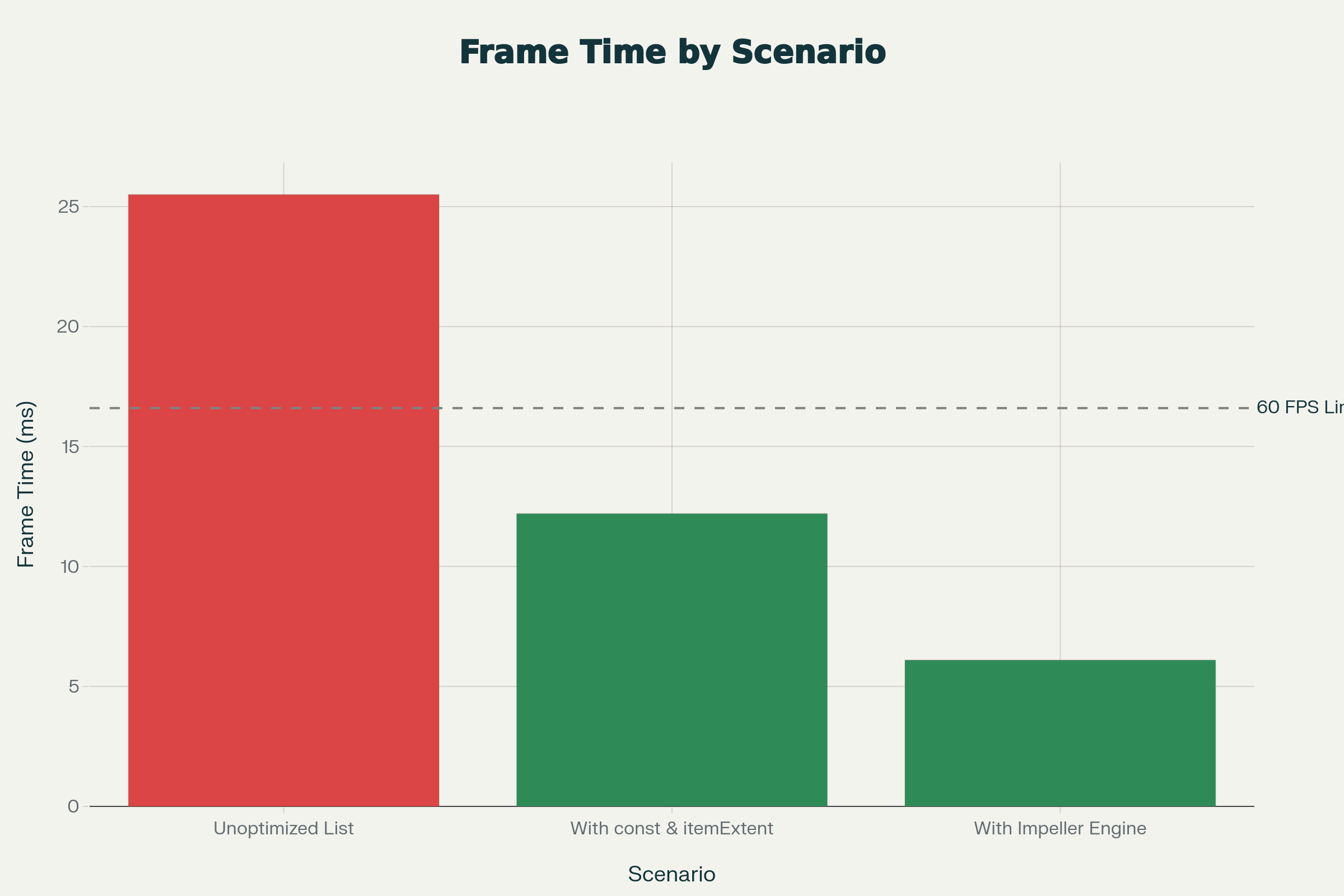
Frame Rasterization Time Comparison (Lower is Better)
The 16ms Rule: You have 16 milliseconds to render a frame for 60fps. If you take 17ms, you dropped a frame. If you take 25ms, the user uninstalls.
Summary: Profile your app in DevTools. If you see red bars, don't ship it. It’s that simple.
Hitik Saini
Author